Education Series
EARN System in Action
Master your Money Date, read the signals, and manage your margin health with confidence. Six deep-dive lessons covering everything behind the Quick Start.
Lesson 1
What Your Money Date Is
Video
Lesson Text
One appointment. Once a month. Everything runs better because of it.
What This Lesson Covers
The Money Date is the central habit of The Blueprint. This lesson explains what it is, why it matters, what it means to tend your system faithfully, and what to have ready before you sit down.
What the Money Date Is
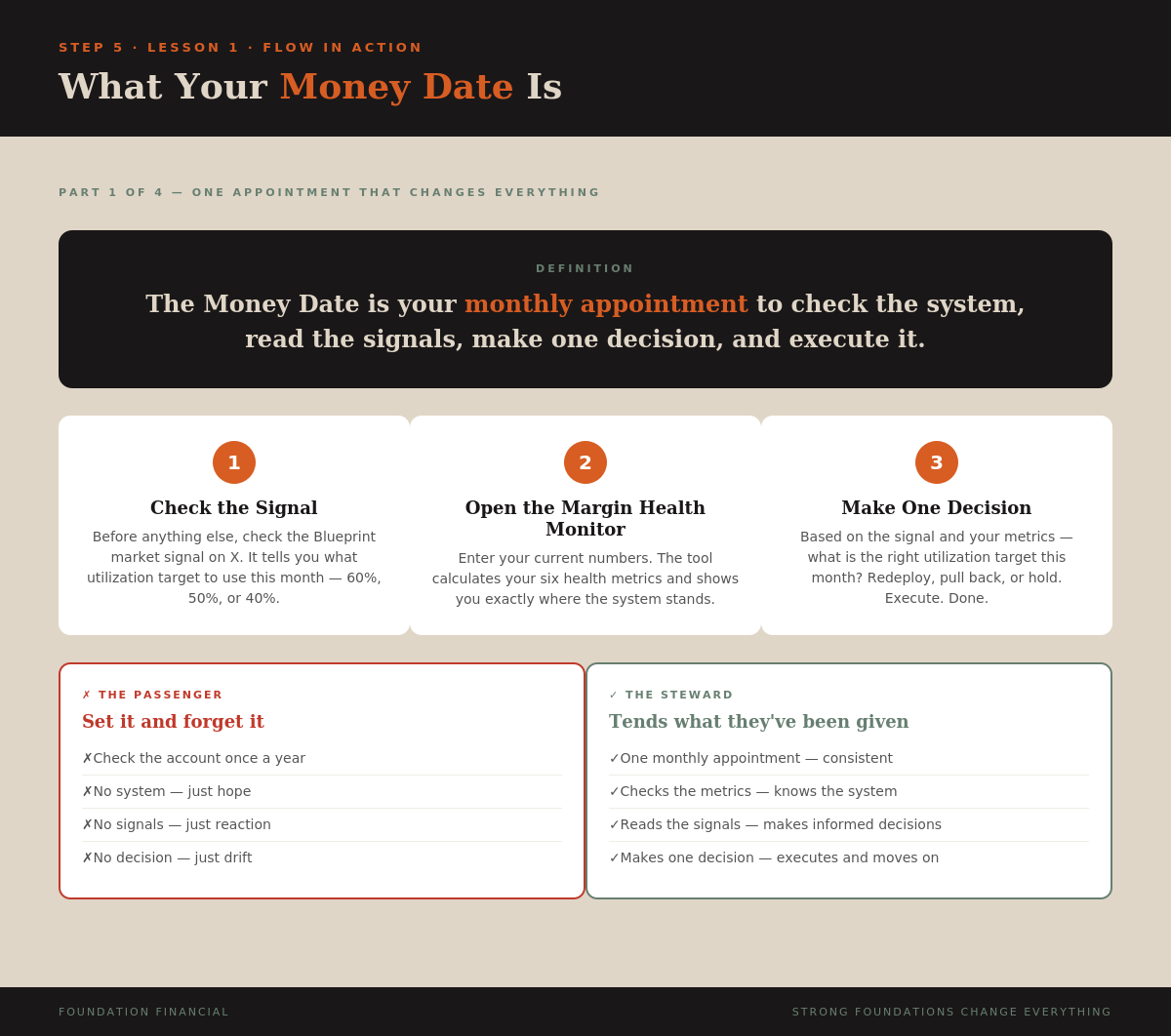
Once a month you sit down with your system. You check the market signal. You open the Margin Health Monitor. You enter your numbers, review your metrics, make one decision, and execute it.
That is it. One appointment. Thirty minutes — maybe less once you have done it a few times.
The Money Date is three things:
- Check the signal — the Blueprint market signal on X tells you what utilization target to use this month
- Open the Margin Health Monitor — enter your numbers and review your six health metrics
- Make one decision — redeploy to target, hold, or reduce — based on the signal and your metrics
The Faithful Steward
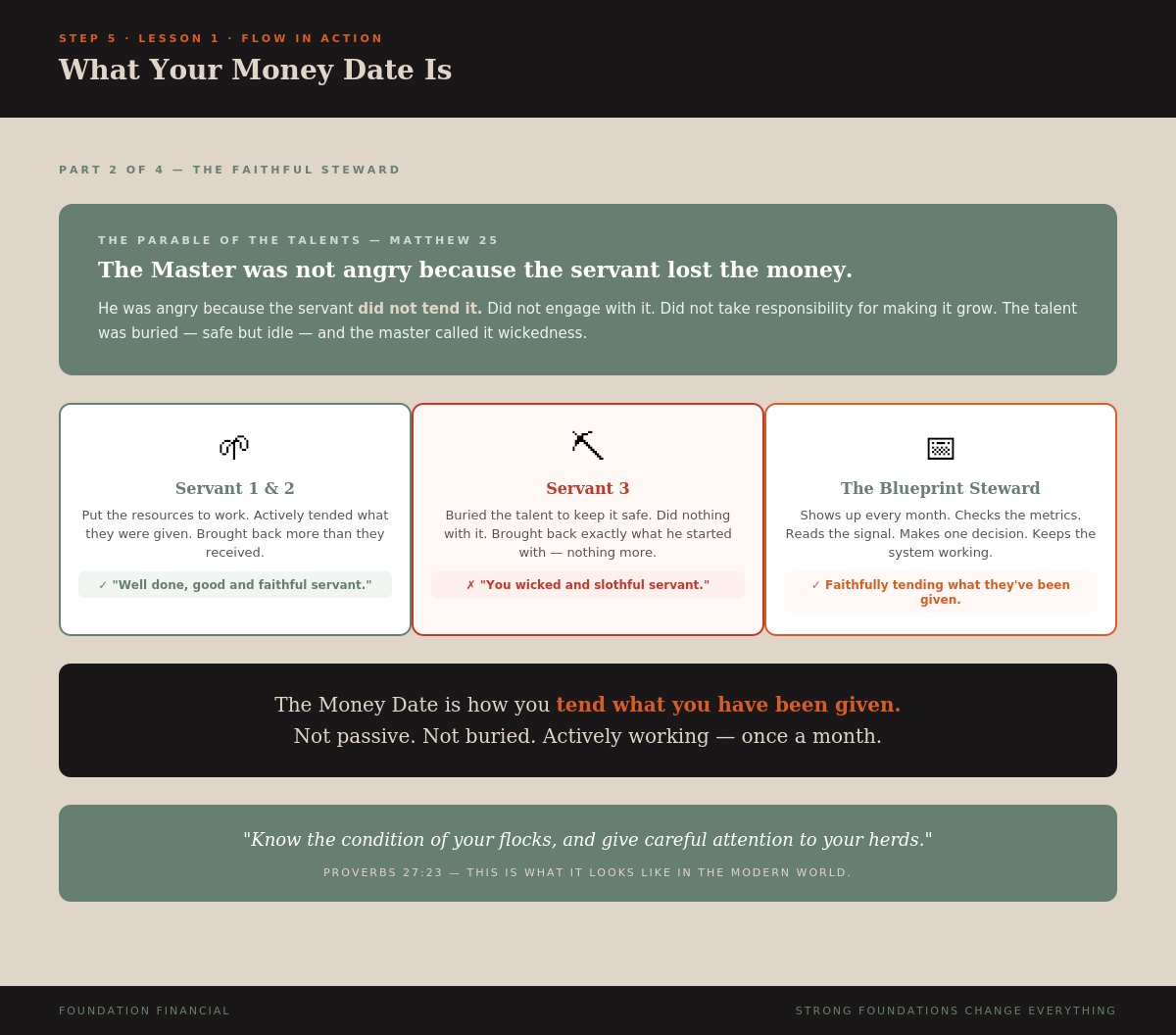
In the Parable of the Talents, the master was not angry because the servant lost the money. He was angry because the servant did not tend it. Did not engage with it. Did not take responsibility for making it grow.
The Money Date is how you tend what you have been given.
"Know the condition of your flocks, and give careful attention to your herds." — Proverbs 27:23
What to Have Ready Before You Sit Down
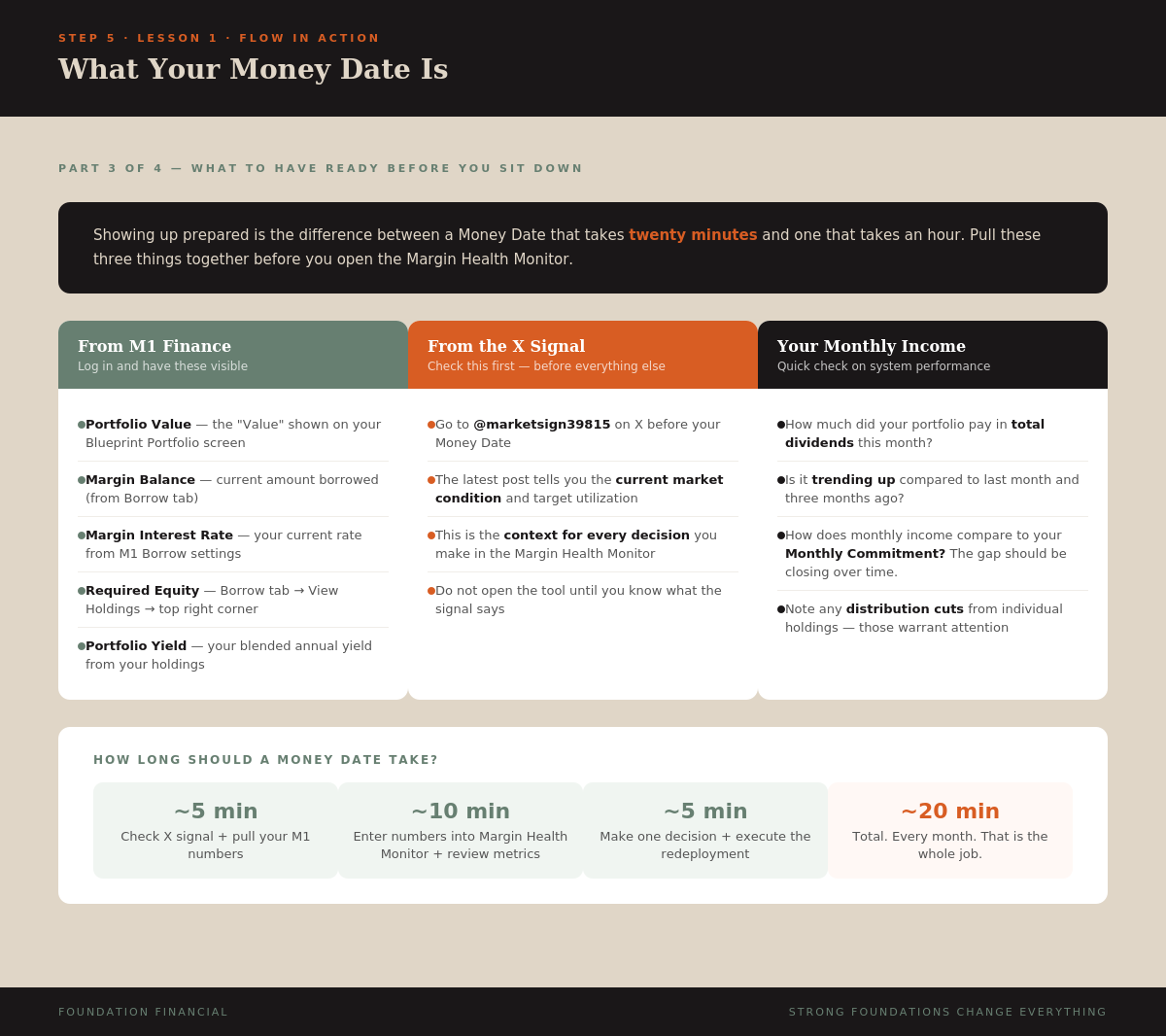
Before you open the Margin Health Monitor, have these ready:
- From M1 Finance — current portfolio value, margin balance, margin interest rate, Required Equity, and portfolio yield
- From X — check @marketsign39815 for the current market signal and utilization target
- Income check — total dividends this month and whether they're trending up
What a Good Money Date Looks Like
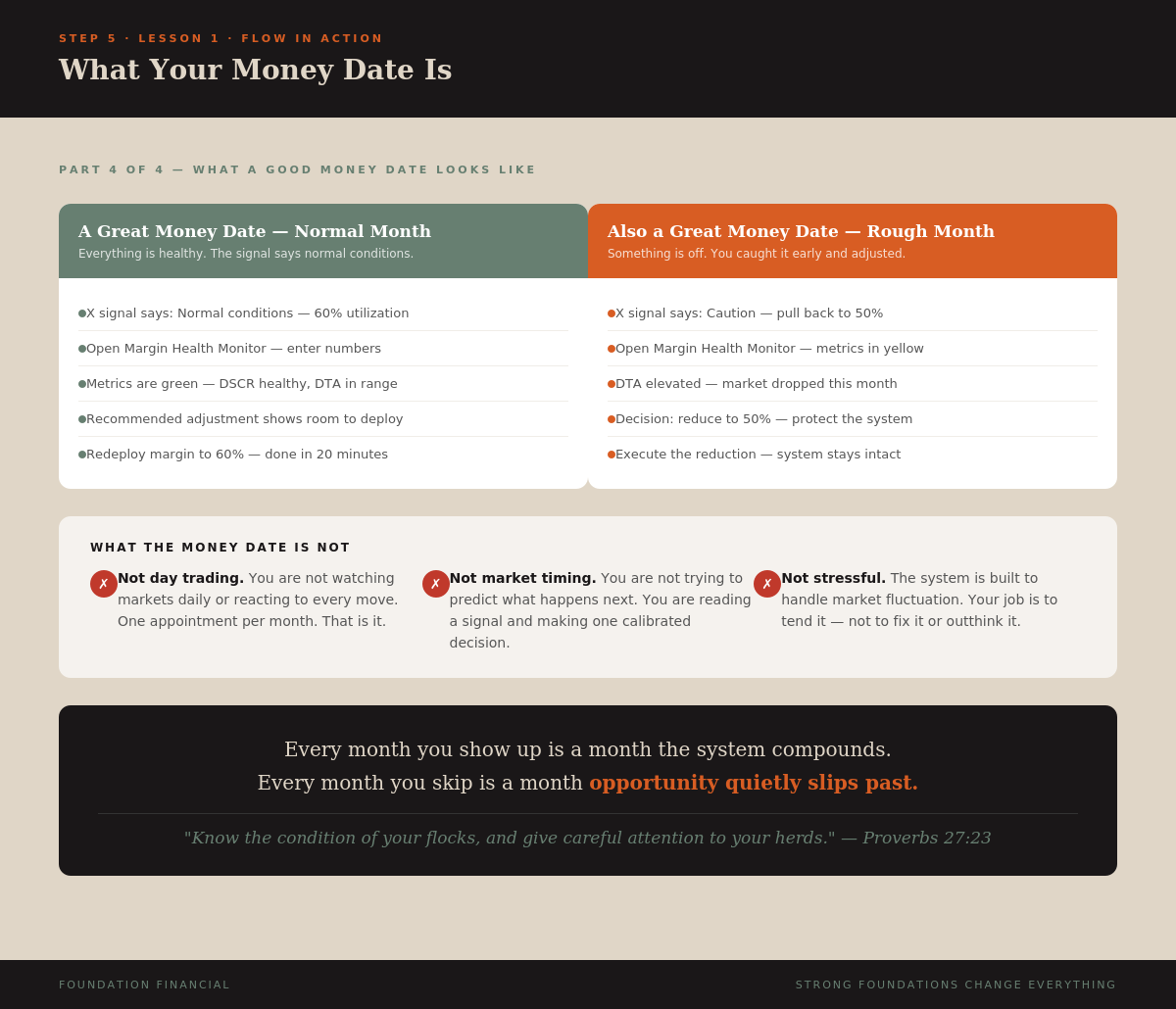
A normal month: signal says normal conditions, metrics are green, you redeploy to 60%, done in 20 minutes. That is a great Money Date.
A rough month: signal says caution, metrics are yellow, you reduce to 50%, protect the cushion, execute. That is also a great Money Date — because you caught it early and made a thoughtful adjustment.
The Money Date is not exciting. That is the point. You are not trying to time the market. You are tending a system designed to run through every kind of market condition.
Infographics
NotebookLM Script (click to expand)
You have built the system. Your accounts are open. Your pie is built. Your automation is running. Your Monthly Commitment is flowing in on schedule.

Now comes the part that separates the students who build real wealth from those who do not.

The Money Date.

Once a month, you sit down with your system. You open the Margin Health Monitor. You check the market signals. You make one decision. And you execute it.

That is it. One appointment per month. Thirty minutes — maybe less once you have done it a few times. And that one appointment is what keeps the whole machine running at its best.

The Blueprint is not built for passengers. It is built for stewards.

In the Parable of the Talents, the master gave resources to three servants. Two of them put the resources to work and brought back more. One buried it and brought back exactly what he started with. The master was not angry because the servant lost the money — the servant did not lose it. He was angry because the servant did not tend it.

The Money Date is how you tend what you have been given.

First, you check the signal. The Blueprint market signal on X tells you what utilization target to use this month. Normal conditions. Caution. Uncertain.

Second, you open the Margin Health Monitor. You enter your current numbers — portfolio value, yield, margin in use, interest rate, and your Required Equity from M1. The tool runs the calculation and gives you your health metrics.

Third, you make one decision. Based on the market signal and your health metrics — what is the right utilization target for this month? One decision. You execute it. Done.

Proverbs 27:23 says to know the condition of your flocks and give careful attention to your herds. This is what that looks like in the modern world. Monthly. Consistent. Faithful.

Show up. Tend the system. Stay faithful.
Key Takeaway
The Money Date is one monthly appointment — check the signal, open the Margin Health Monitor, make one decision, execute. Twenty minutes of faithful stewardship that keeps your entire EARN system running.
Lesson 2
Using the Margin Health Monitor
Video
Lesson Text
Every input. Every output. What the numbers mean.
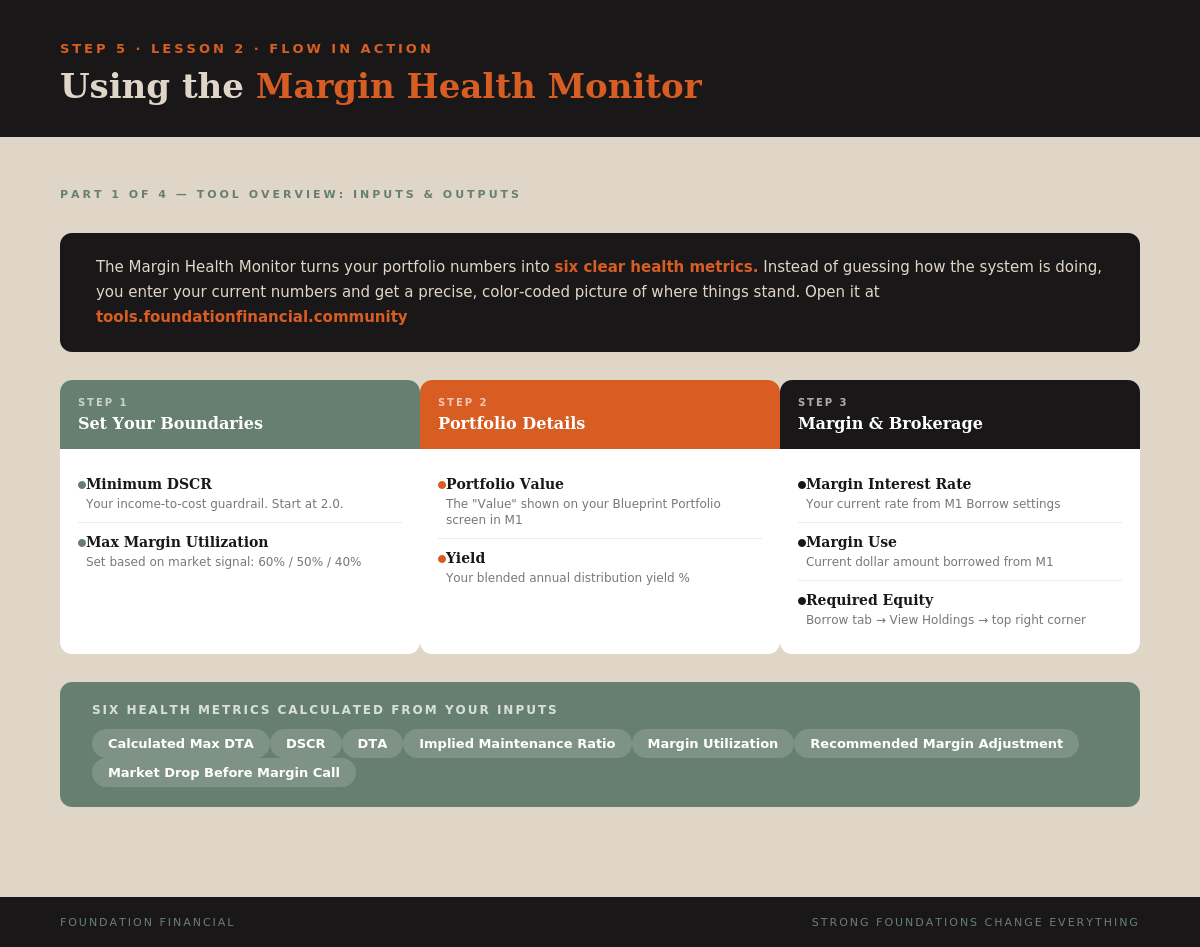
The Three Input Sections
Step 1 — Set Your Boundaries
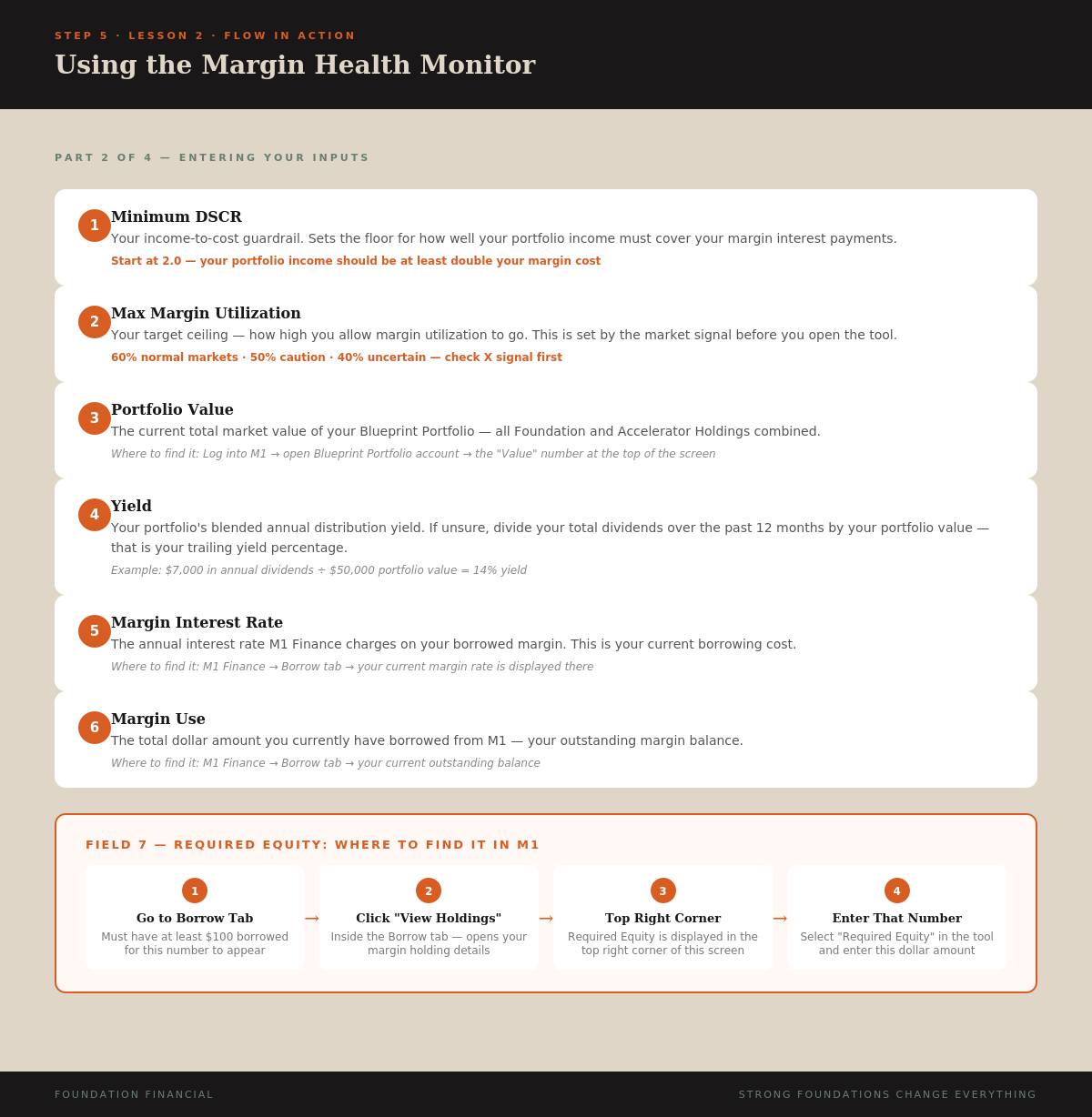
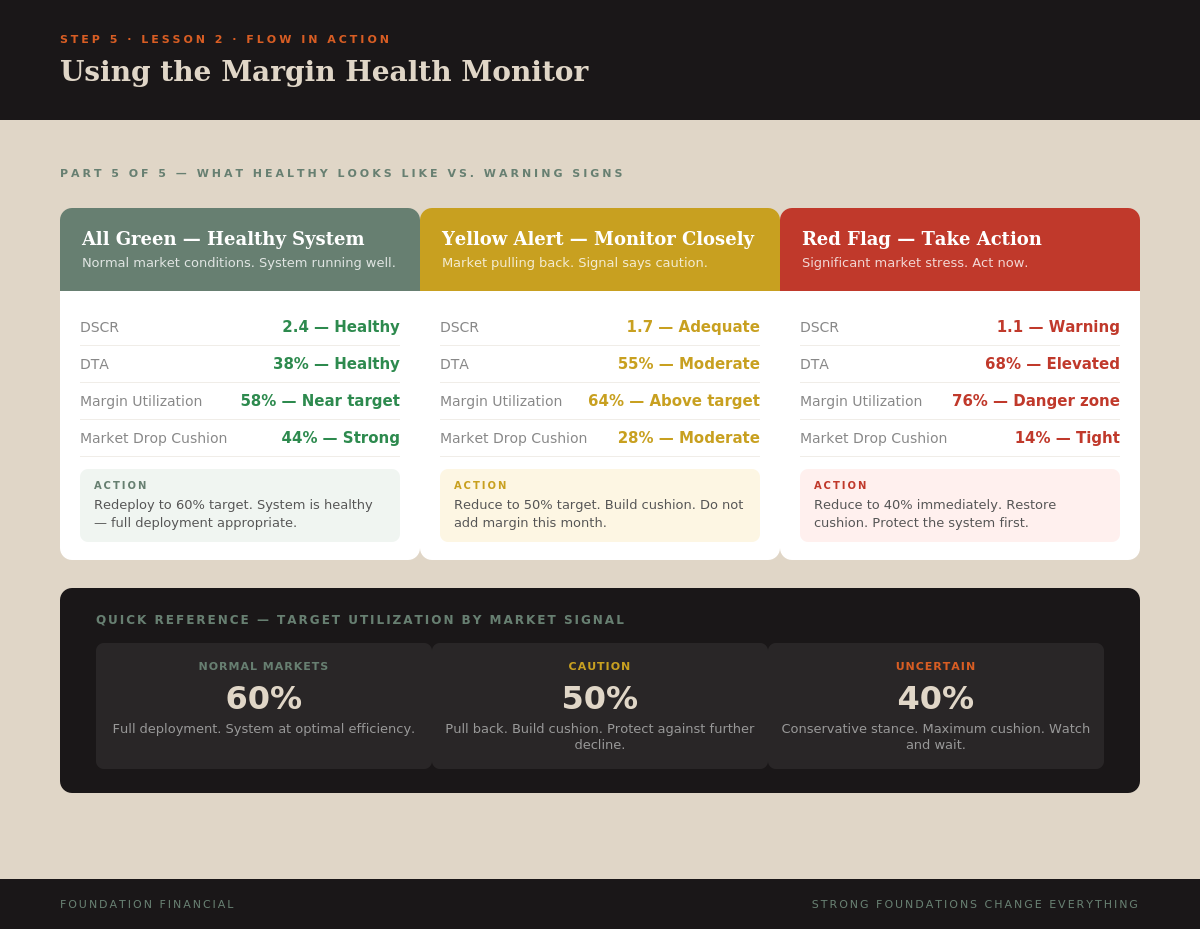
- Minimum DSCR: Set to 2.0 — your portfolio income must be at least twice your margin interest cost
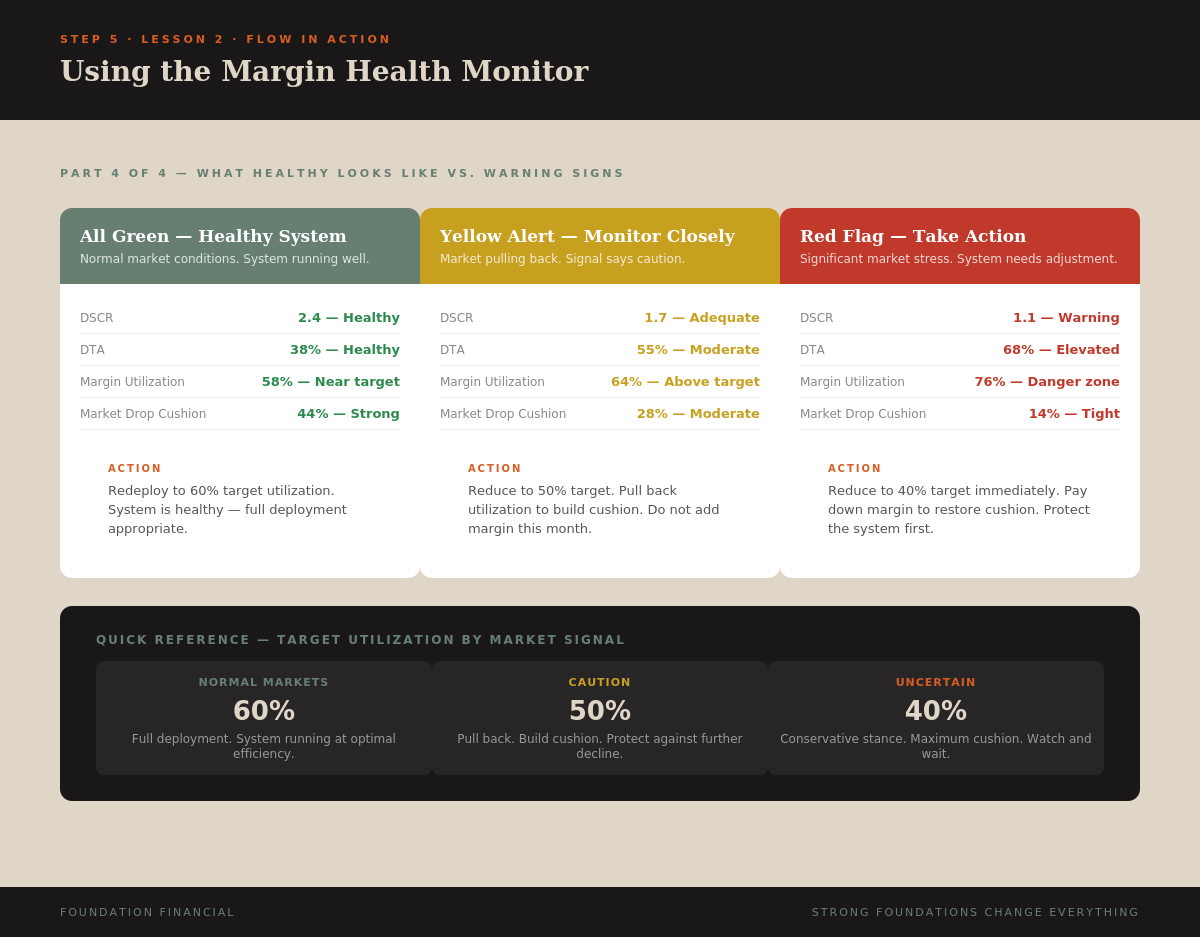
- Max Margin Utilization: Set based on market signal — Normal = 60%, Caution = 50%, Uncertain = 40%
Step 2 — Portfolio Details
- Portfolio Value: Total market value of your Blueprint Portfolio from M1 Finance
- Yield: Your portfolio's blended annual distribution yield
Step 3 — Margin Usage & Brokerage Inputs
- Margin Interest Rate: Annual rate M1 charges on borrowed margin (Borrow tab)
- Margin Use: Total dollar amount currently borrowed
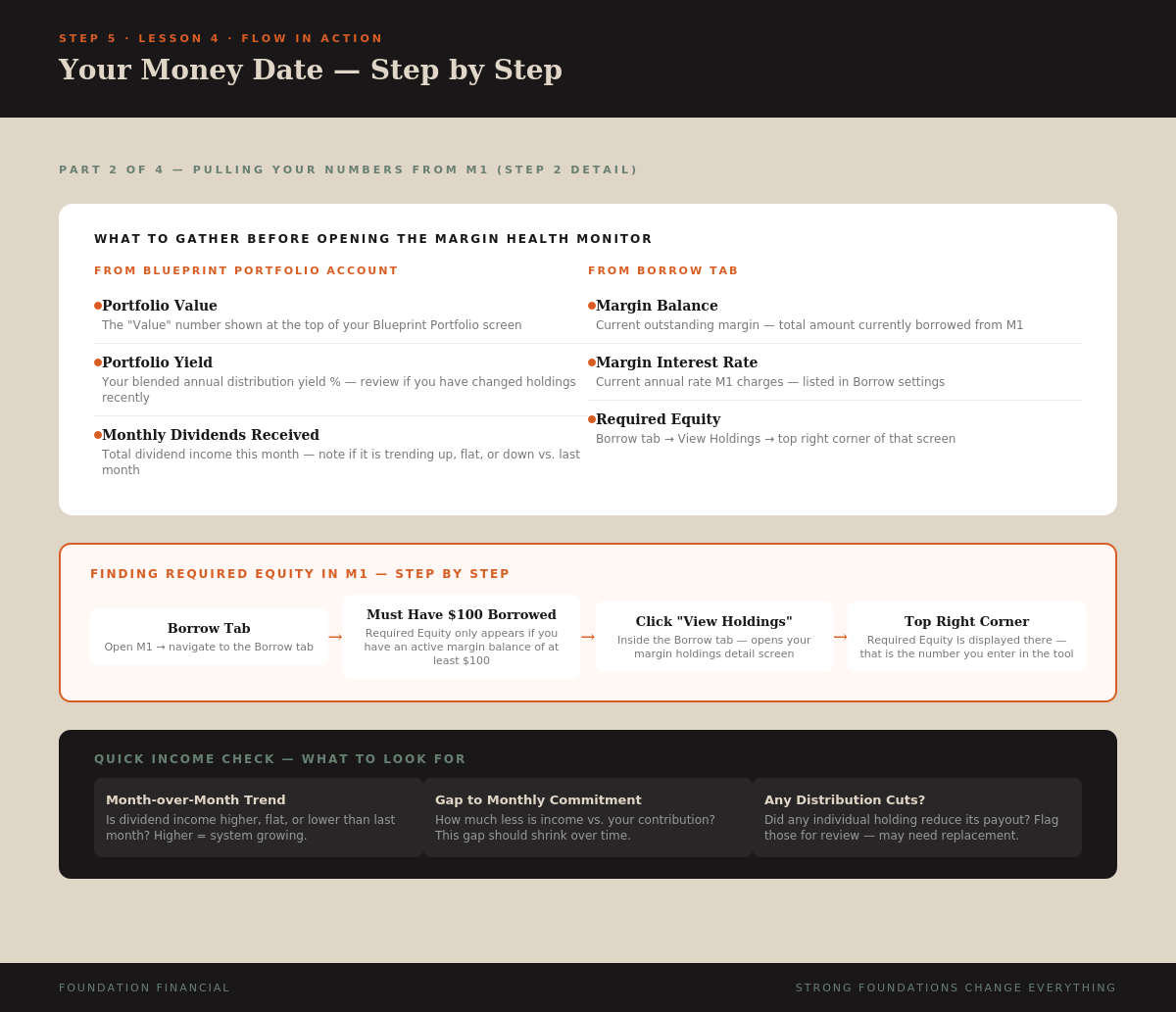
- Required Equity: Minimum equity to avoid margin call (Borrow tab → View Holdings → top right)
The Six Health Metrics
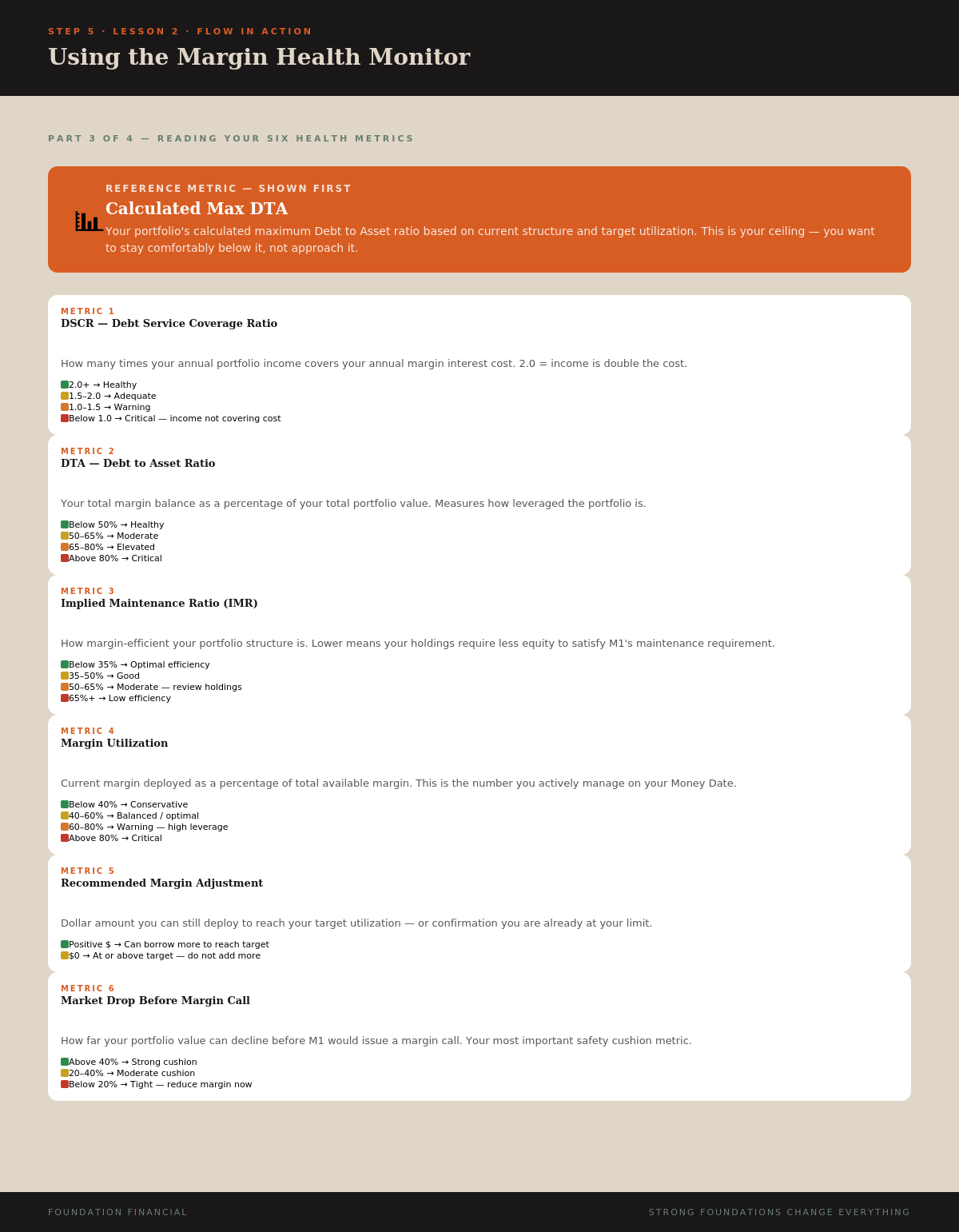
- DSCR — How many times your income covers your margin cost. Green = 2.0+
- DTA — Margin balance as % of portfolio. Green = below 50%
- Implied Maintenance Ratio — Portfolio margin efficiency. Green = below 35%
- Margin Utilization — Current margin vs. available. Match your signal target
- Recommended Margin Adjustment — Dollar amount to deploy or hold
- Market Drop Before Margin Call — Your safety cushion. Green = above 40%
Reading Priority Order
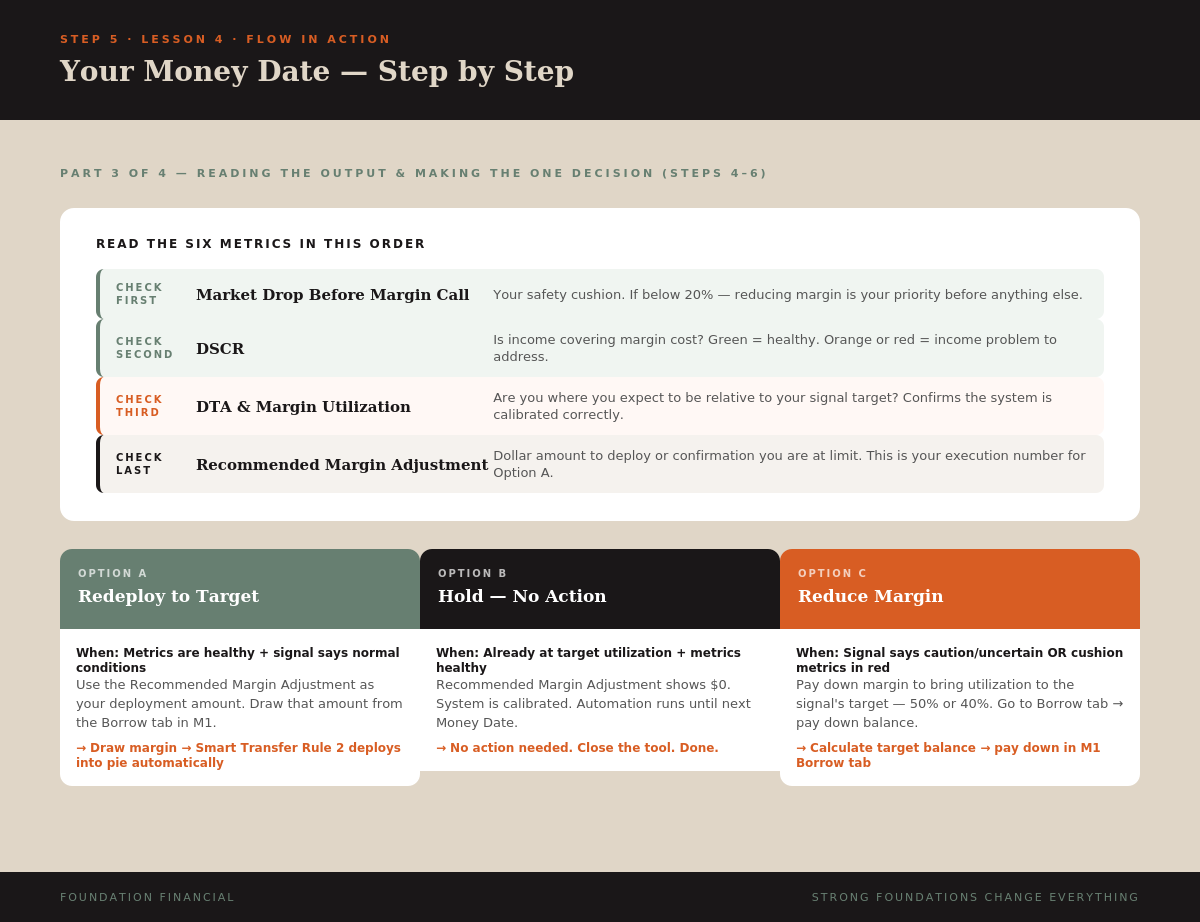
Check Market Drop Before Margin Call first. If below 20% — reduce regardless of everything else. Then DSCR. Then DTA and Utilization. Then the Recommended Adjustment — your execution number.
Infographics
NotebookLM Script (click to expand)
The Margin Health Monitor is the tool that makes your Money Date concrete. Instead of guessing how the system is doing, you enter a few numbers and get six specific metrics that tell you exactly where things stand.

The tool has three sections of inputs.

Section 1 — Set Your Boundaries. Minimum DSCR set to 2.0. Max Margin Utilization set based on the market signal — 60, 50, or 40 percent.

Section 2 — Portfolio Details. Portfolio Value from M1 Finance. Yield — your blended annual distribution yield.

Section 3 — Margin Usage and Brokerage Inputs. Margin Interest Rate from the Borrow tab. Margin Use — your outstanding balance. Required Equity — found in Borrow tab → View Holdings → top right corner. Need at least $100 borrowed for it to appear.

Hit Calculate Results.

Six health metrics:

DSCR — income coverage. 2.0+ is healthy. Below 1.0 means income not covering cost.
DTA — debt to asset ratio. Green below 50%.
Implied Maintenance Ratio — portfolio margin efficiency. Lower is better.
Margin Utilization — what you actively manage. Match your signal target.
Recommended Margin Adjustment — your execution number in dollars.
Market Drop Before Margin Call — your safety cushion. Check this first every Money Date.

Your system speaks. This is how you listen to it.
Key Takeaway
Seven inputs. Six health metrics. One clear recommendation. The Margin Health Monitor turns raw numbers into actionable decisions — check Market Drop cushion first, then DSCR, then execute the recommended adjustment.
Lesson 3
Reading the Market Signals
Video
Lesson Text
Check it first. Use it. Respect it.
The Three Signal Conditions
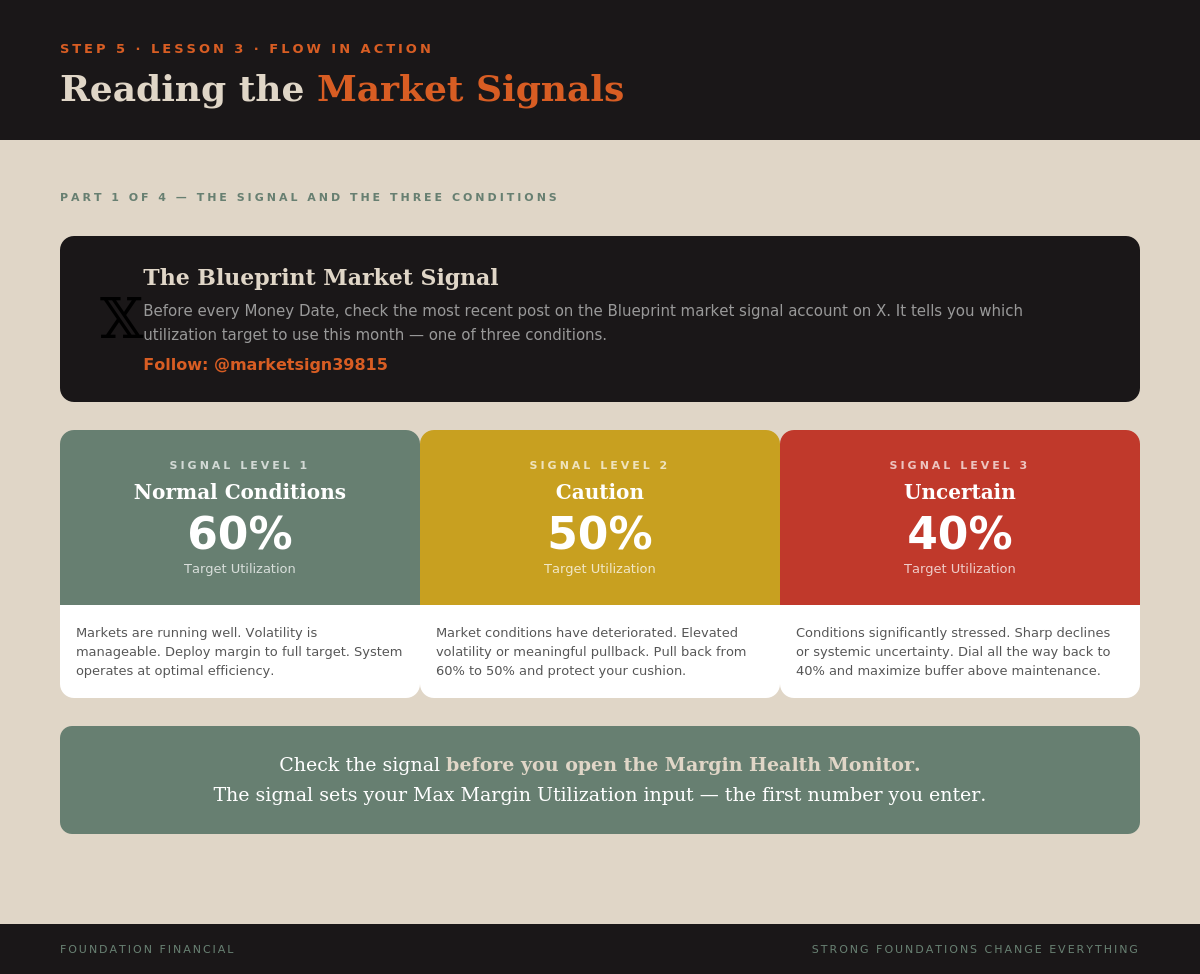
- Normal Conditions — 60% Markets running well. Deploy margin to full target.
- Caution — 50% Elevated volatility or meaningful pullback. Pull back and protect cushion.
- Uncertain — 40% Significantly stressed conditions. Maximize buffer above maintenance threshold.
The Discipline of Respecting the Signal
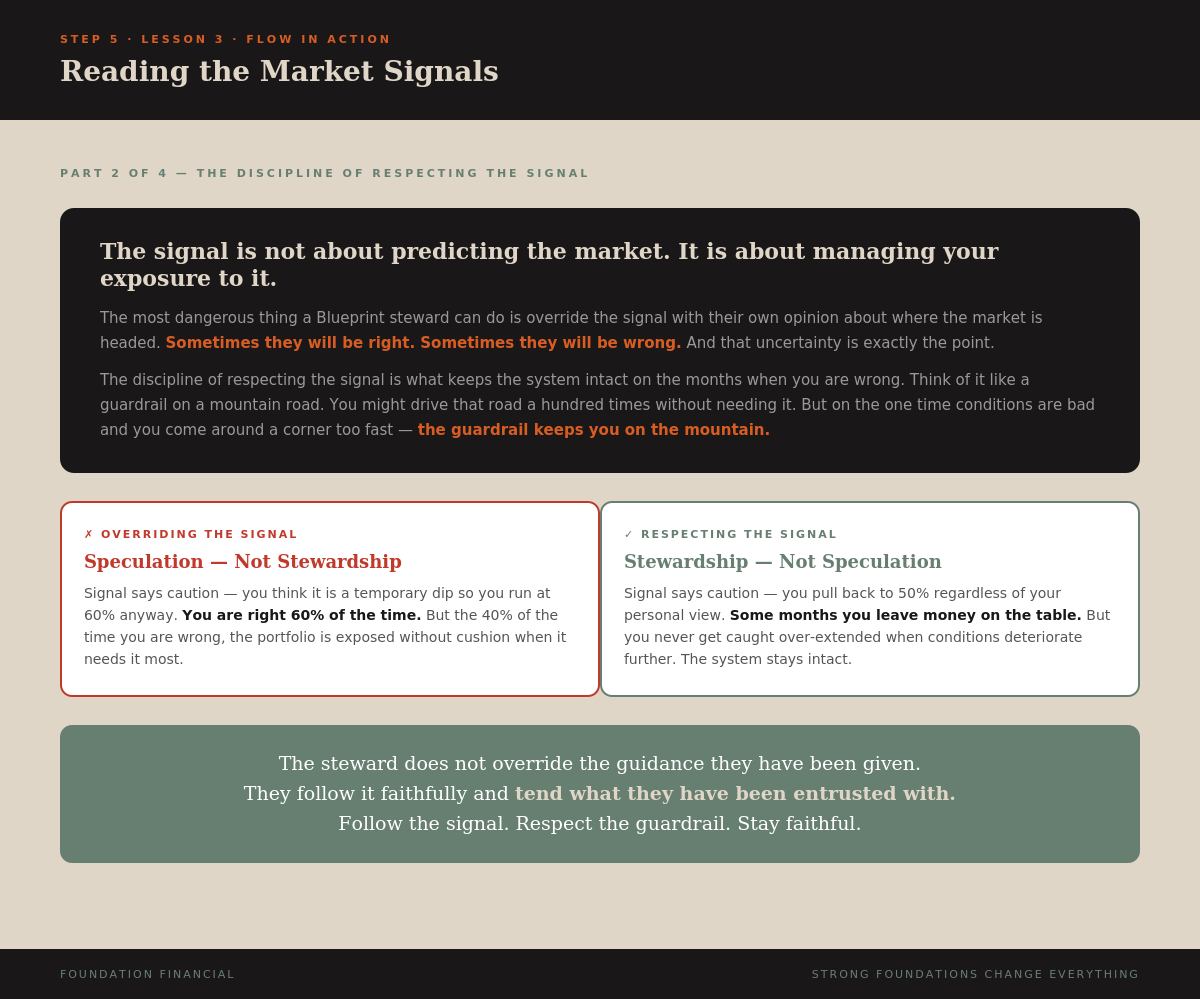
The most important thing about the signal: respect it. Even when you disagree with it.
The signal is not about predicting the market. It is about managing your exposure to the market. The discipline of respecting the signal is what keeps the system intact on the months when you are wrong.
"The wise see danger and take refuge, but the simple keep going and pay the penalty." — Proverbs 22:3
Infographics
NotebookLM Script (click to expand)
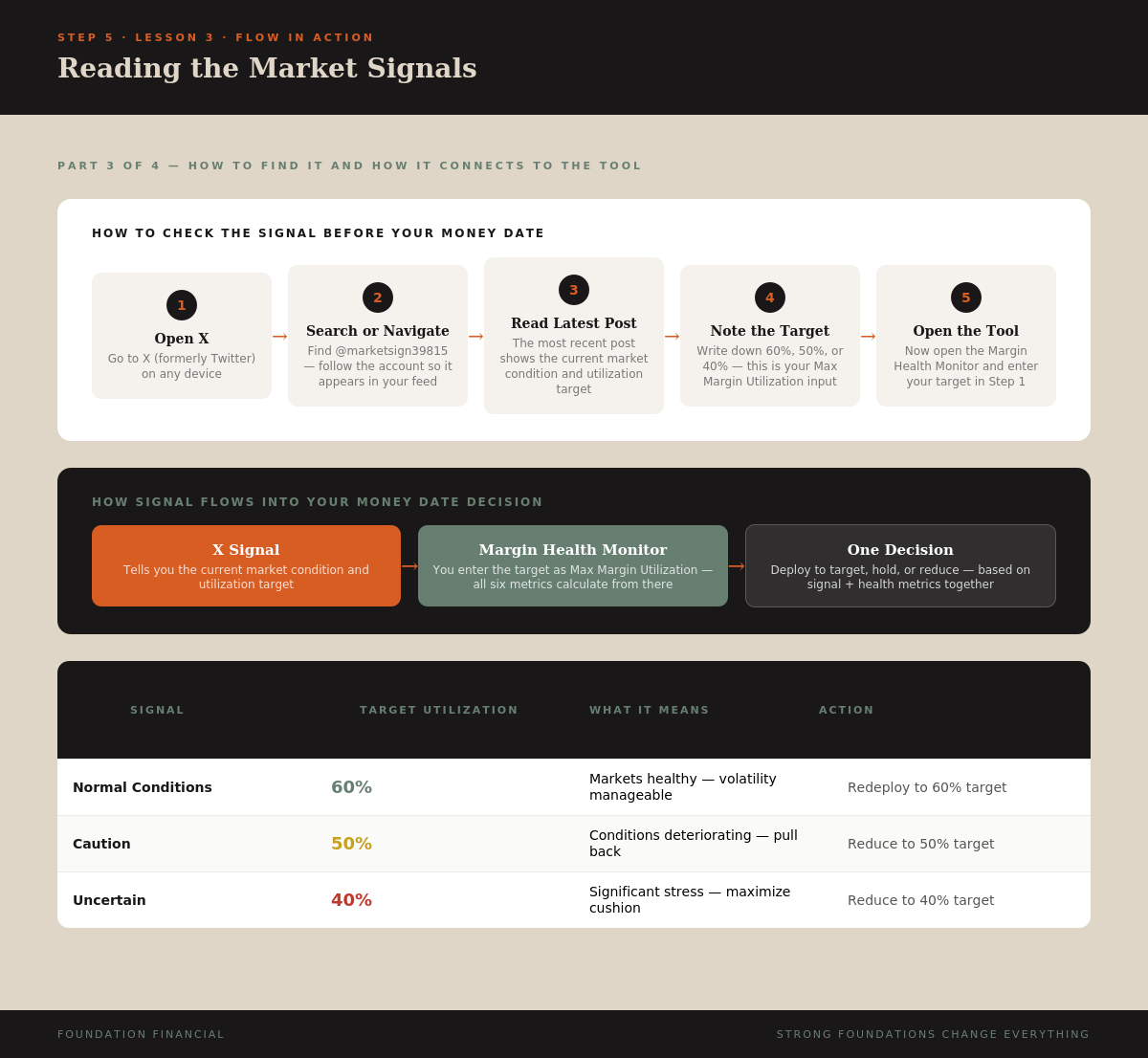
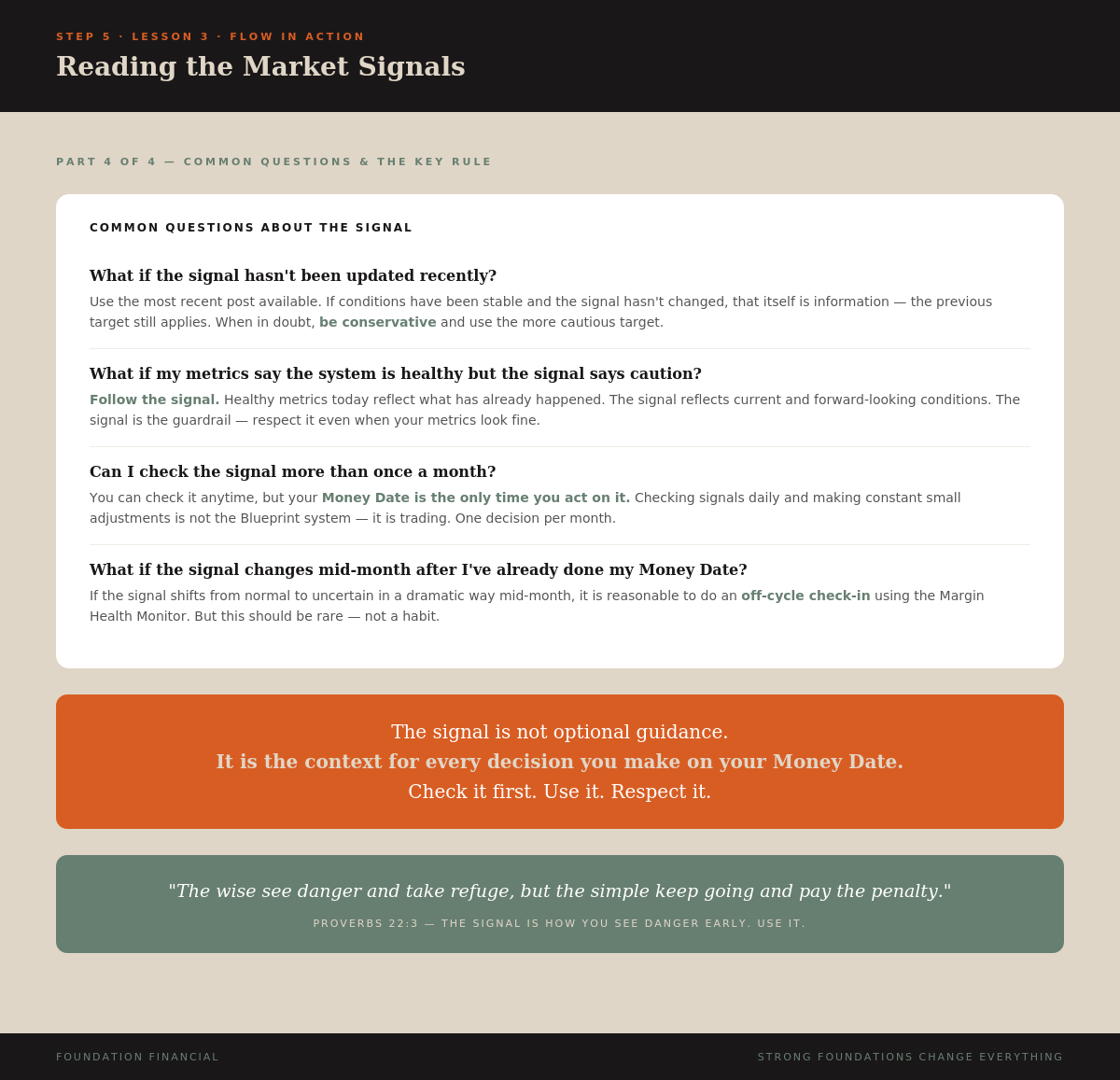
Before every Money Date, before you open the Margin Health Monitor, before you enter a single number — you check the signal.

The Blueprint market signal is posted on X at marketsign39815. Follow that account. Before your Money Date each month, read the most recent post. That post tells you what utilization target to use.

Three signal levels. Normal — 60 percent. Caution — 50 percent. Uncertain — 40 percent. Your utilization target shifts by ten percentage points per level.

Respect it. Even when you disagree with it. The signal is not about predicting the market. It is about managing your exposure. Think of it like a guardrail on a mountain road — you might drive it a hundred times without needing it, but on the one time the road is wet, it keeps you on the mountain.

Follow the signal. Respect the guardrail. Stay faithful.
Key Takeaway
Three conditions. Three targets. Check @marketsign39815 before every Money Date. Normal = 60%, Caution = 50%, Uncertain = 40%. The signal is your guardrail — follow it, even when you disagree.
Lesson 4
Your Money Date — Step by Step
Video
Lesson Text
Seven steps. Twenty minutes. Once a month.
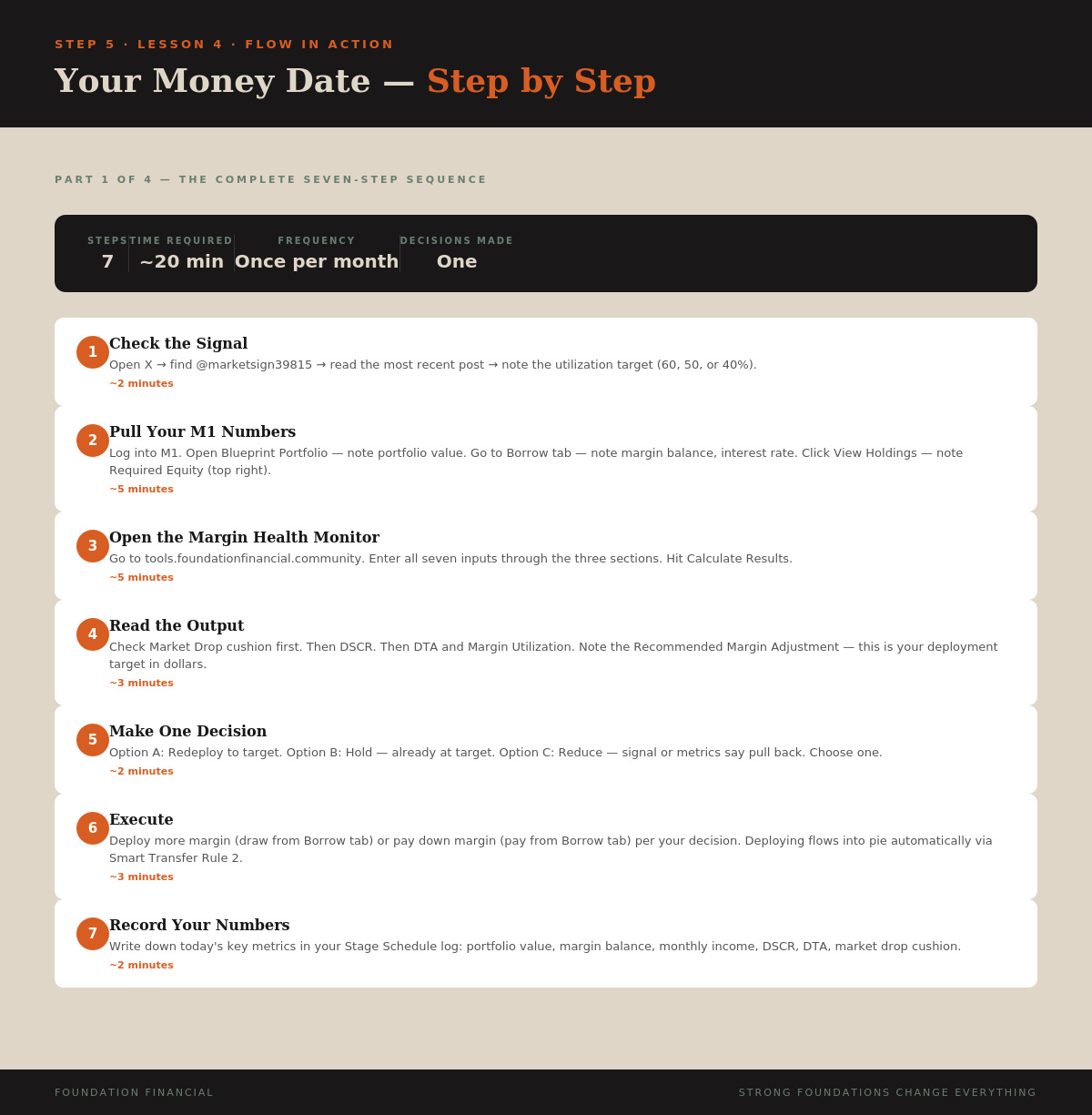
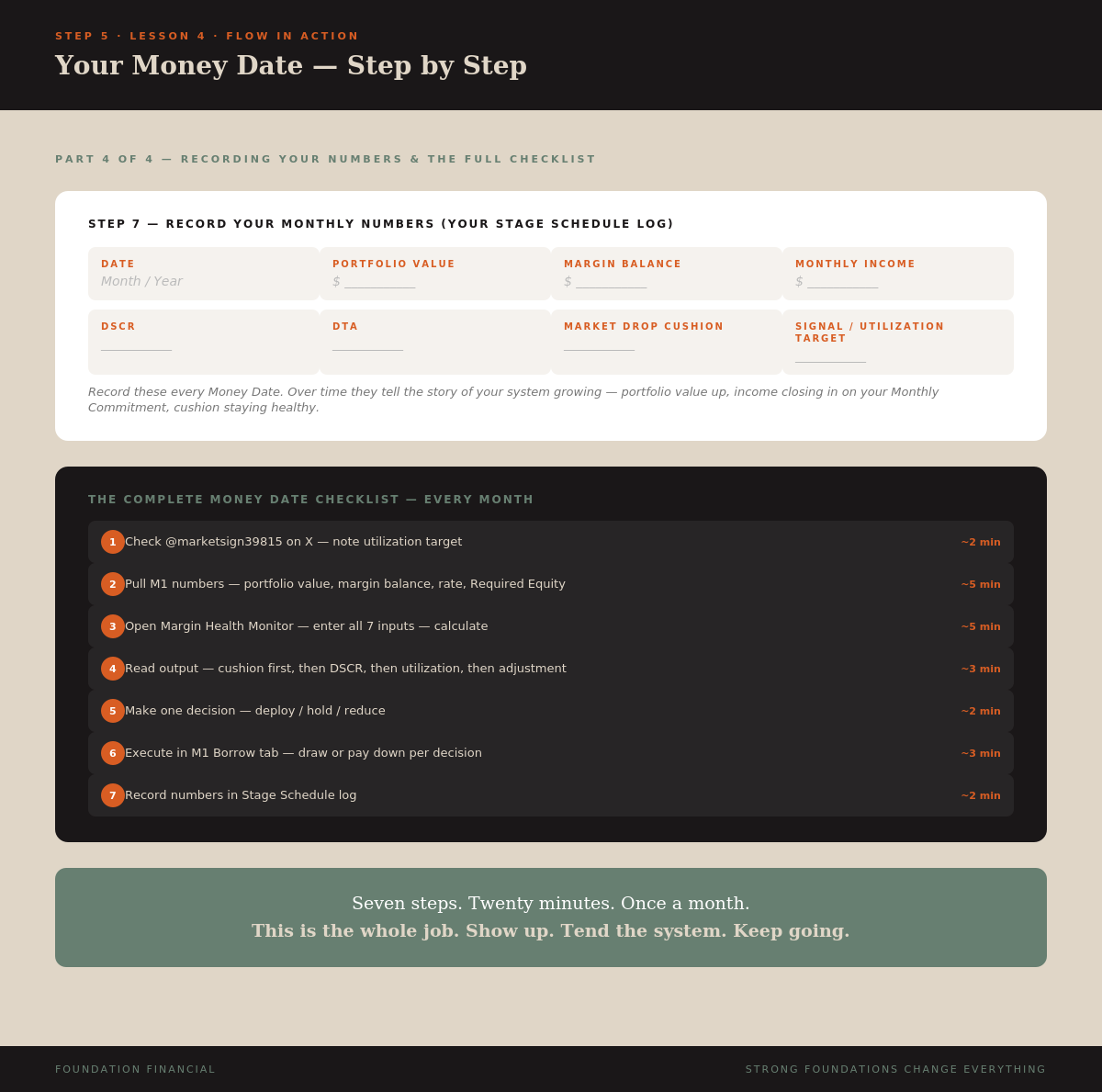
- Check the Signal (~2 min) — Open X → @marketsign39815 → note utilization target
- Pull Your M1 Numbers (~5 min) — Portfolio value, margin balance, interest rate, Required Equity, dividends
- Open the Margin Health Monitor (~5 min) — Enter all numbers through three input sections at tools.foundationfinancial.community
- Read the Output (~3 min) — Market Drop cushion first, then DSCR, DTA, Utilization, Recommended Adjustment
- Make One Decision (~2 min) — Redeploy to target / Hold / Reduce
- Execute (~3 min) — Draw margin, pay down margin, or close the tool
- Record Your Numbers (~2 min) — Log date, portfolio value, margin balance, income, DSCR, DTA, cushion, signal
Total time: approximately 20 minutes per month.
Seven steps. One decision. Every month. The system compounds. You tend it. That is the whole job.
Infographics
NotebookLM Script (click to expand)
This is the Money Date playbook. Step by step.

Step one — Check the signal. Open X, find marketsign39815, note the utilization target.

Step two — Pull your M1 numbers. Portfolio value, margin balance, interest rate, Required Equity, dividend income.

Step three — Open the Margin Health Monitor at tools.foundationfinancial.community. Enter all numbers. Hit Calculate.

Step four — Read the output. Market Drop cushion first. Then DSCR. Then DTA and Utilization. Then Recommended Adjustment.

Step five — Make one decision. Redeploy, hold, or reduce.

Step six — Execute. Draw margin, pay down, or close the tool.

Step seven — Record your numbers. Portfolio value, margin balance, income, DSCR, DTA, cushion, signal.

Seven steps. Twenty minutes. Once a month. The system compounds. You tend it.
Key Takeaway
The complete Money Date playbook: signal → numbers → calculator → read → decide → execute → record. Seven steps, twenty minutes, one decision. This is what faithful stewardship looks like in practice.
Lesson 5
When Things Get Rough
Video
Lesson Text
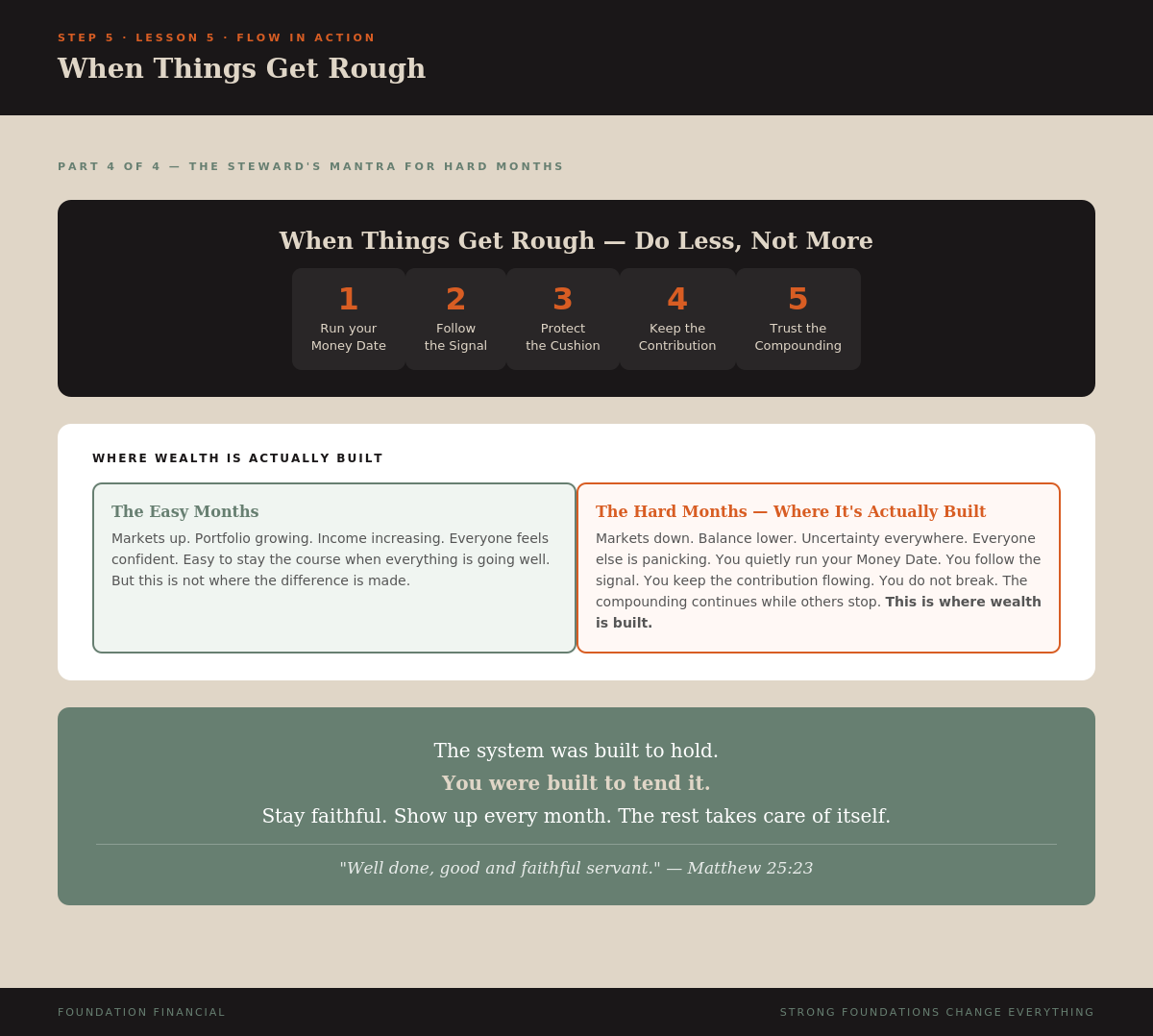
The system was built to hold. You were built to tend it.
What Actually Happens When Markets Drop
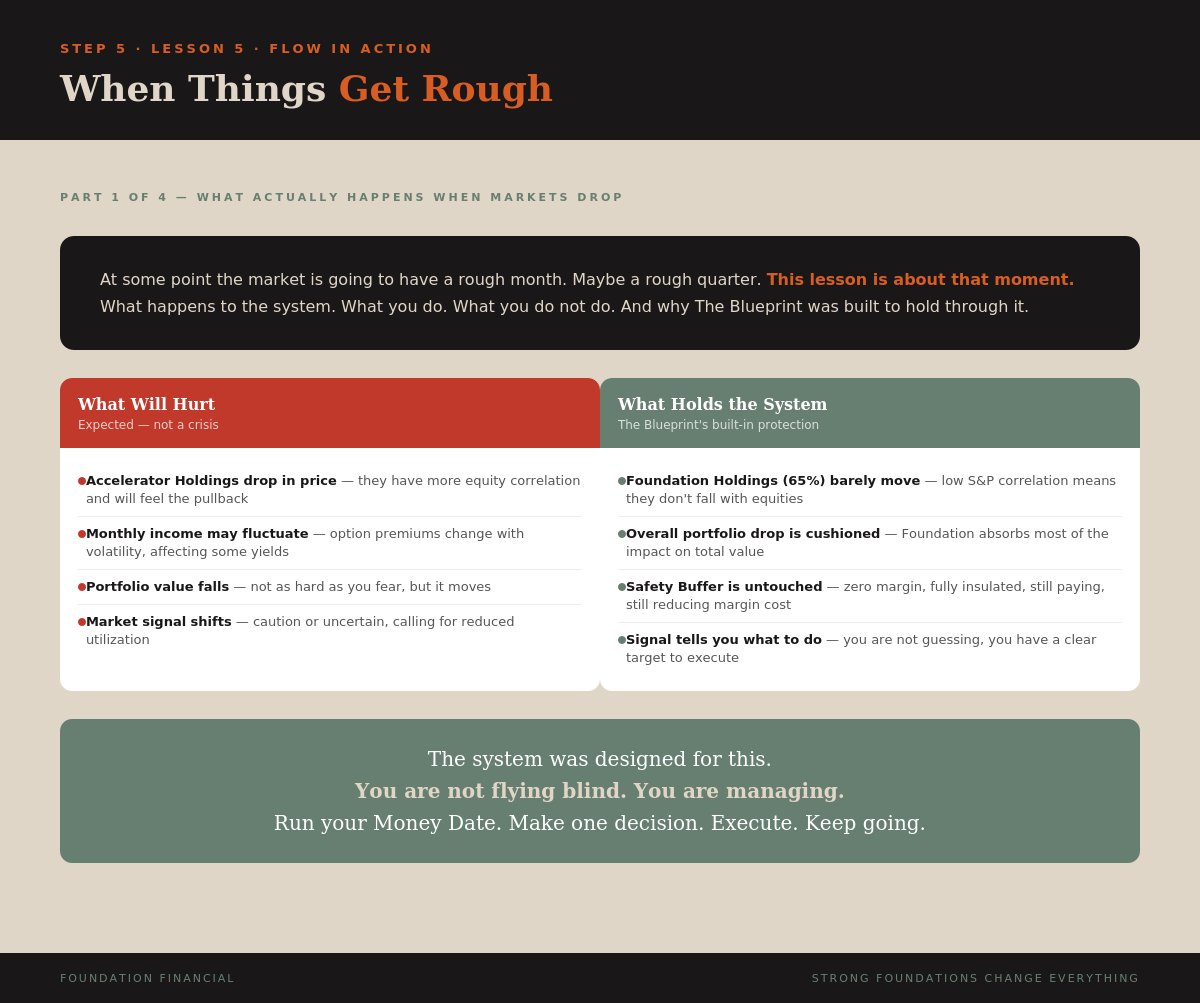
Your Accelerator Holdings will likely drop. But your Foundation Holdings — the 65% chosen for low S&P 500 correlation — will not move the same way. Senior loan funds, CLO ETFs, credit-market assets move independently. Your Safety Buffer is completely unaffected. Zero margin. Fully insulated.
And the market signal shifts. Your Money Date calls for pulling back. The system adjusts.
What to Do
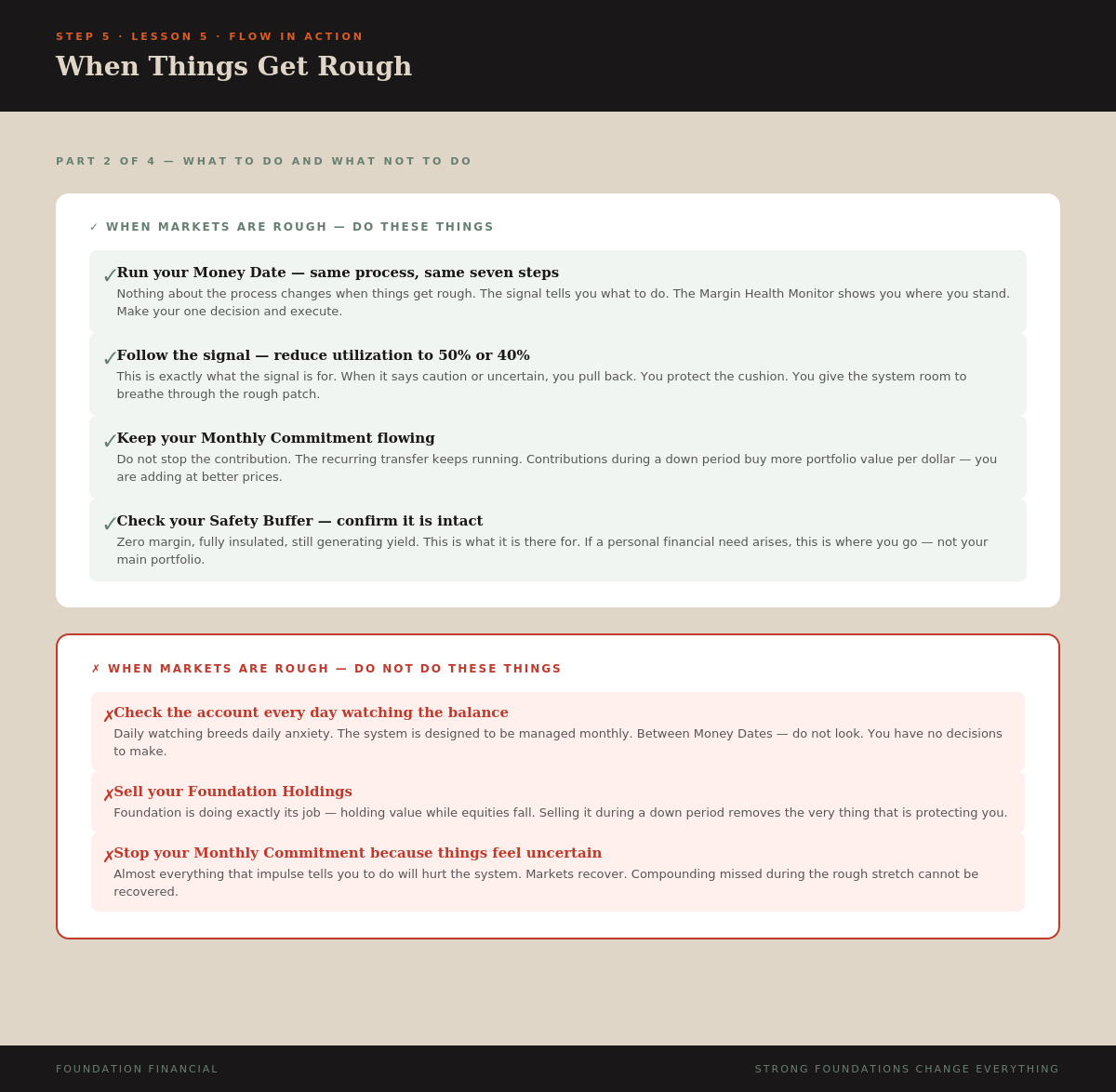
- Run your Money Date — same process, same seven steps
- Follow the signal — reduce to 50% or 40% as called
- Keep your Monthly Commitment — contributions during a down period buy more per dollar
- Check your Safety Buffer — confirm it's intact
What NOT to Do
- Do not check the account every day
- Do not sell your Foundation Holdings
- Do not stop your Monthly Commitment
The Steward's Mantra for Hard Months
- Run your Money Date
- Follow the signal
- Protect the cushion
- Keep the contribution
- Trust the compounding
"Well done, good and faithful servant." — Matthew 25:23
Infographics
NotebookLM Script (click to expand)
At some point the market is going to have a rough month. This lesson is about that moment.

Your Accelerator Holdings will drop. But your Foundation Holdings — 65 percent of your portfolio chosen for low S&P 500 correlation — will not move the same way. Your Safety Buffer is completely unaffected. And the market signal shifts to caution or uncertain.

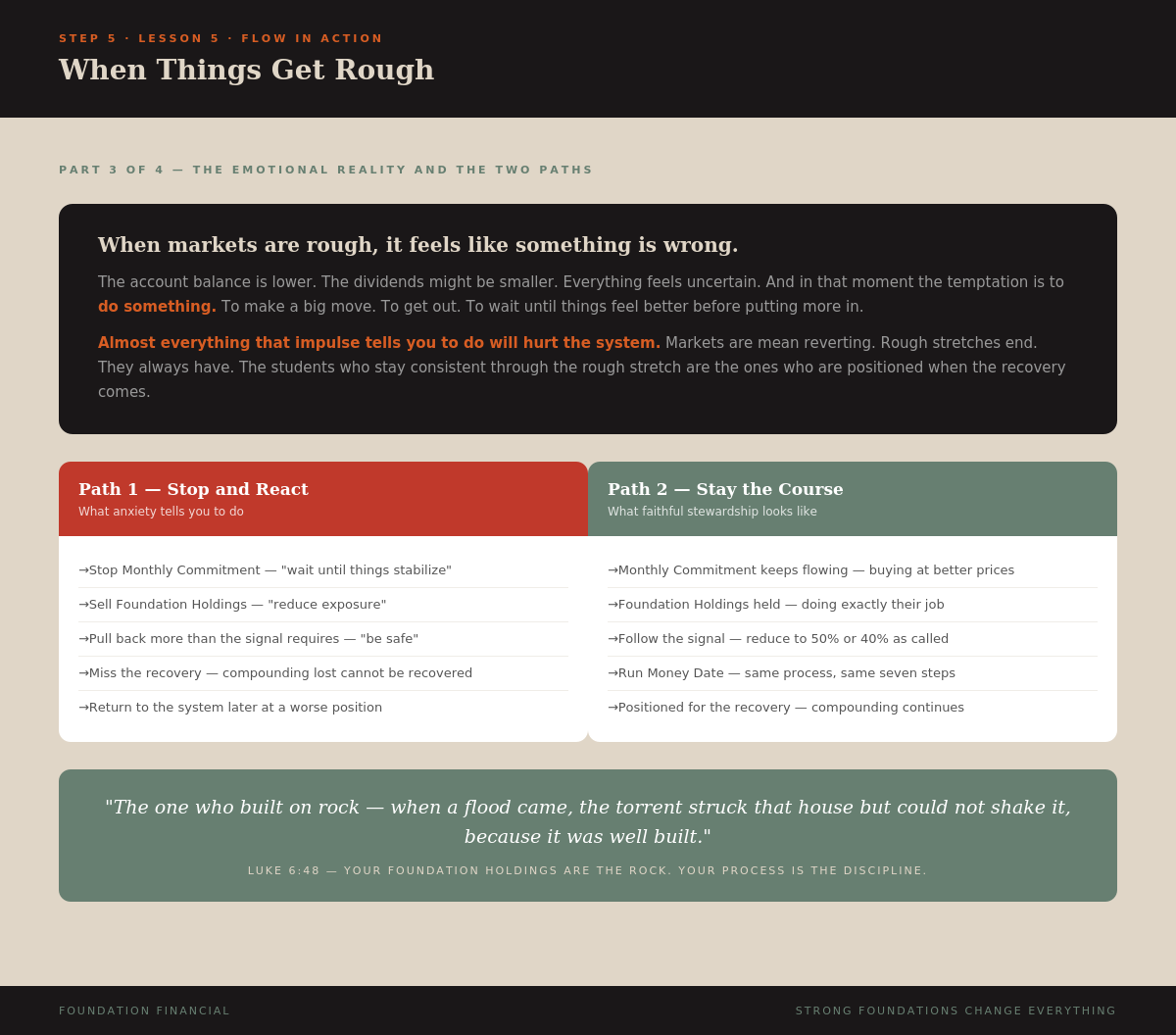
When things get rough — do less, not more. Run your Money Date. Follow the signal. Protect the cushion. Keep the contribution flowing. Trust the compounding.

Wealth is not built in the easy months. It is built in the hard months when everyone else is panicking and you quietly do your Money Date and keep going.

The system was built to hold. You were built to tend it. Stay faithful.
Key Takeaway
When markets drop: do less, not more. Foundation Holdings absorb the shock, the signal tells you to pull back, and you execute the same seven-step process. The students who stay consistent through rough months are the ones positioned when recovery comes.
Lesson 6
The Smart Transfer Rules
Video
Lesson Text
Two rules. Fully automated. System goes live.
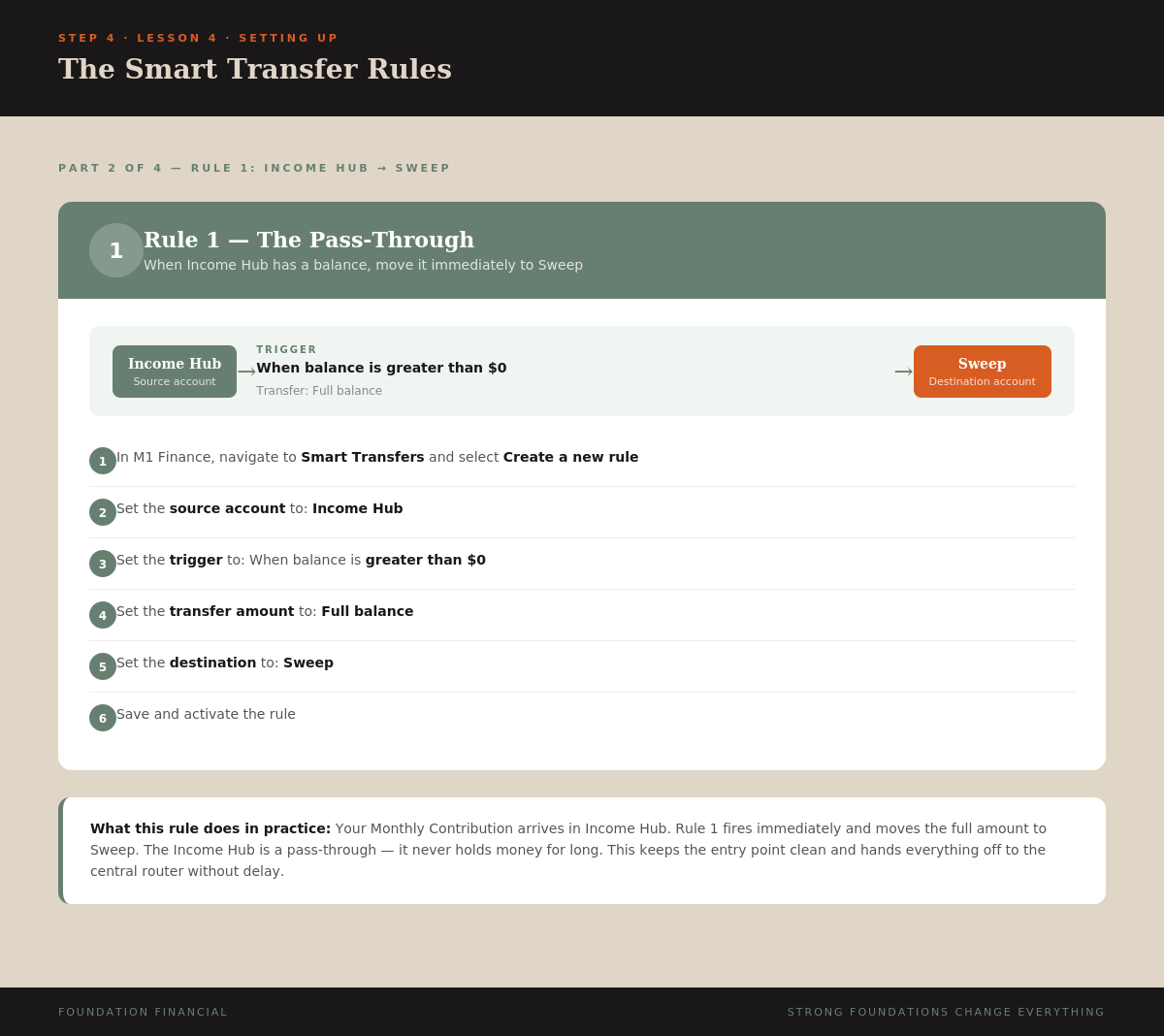
Rule 1 — Income Hub to Sweep
When Income Hub balance > $0, transfer full balance to Sweep. The Income Hub is a pass-through — money never sits there. The moment your Monthly Contribution arrives, it moves to Sweep automatically.
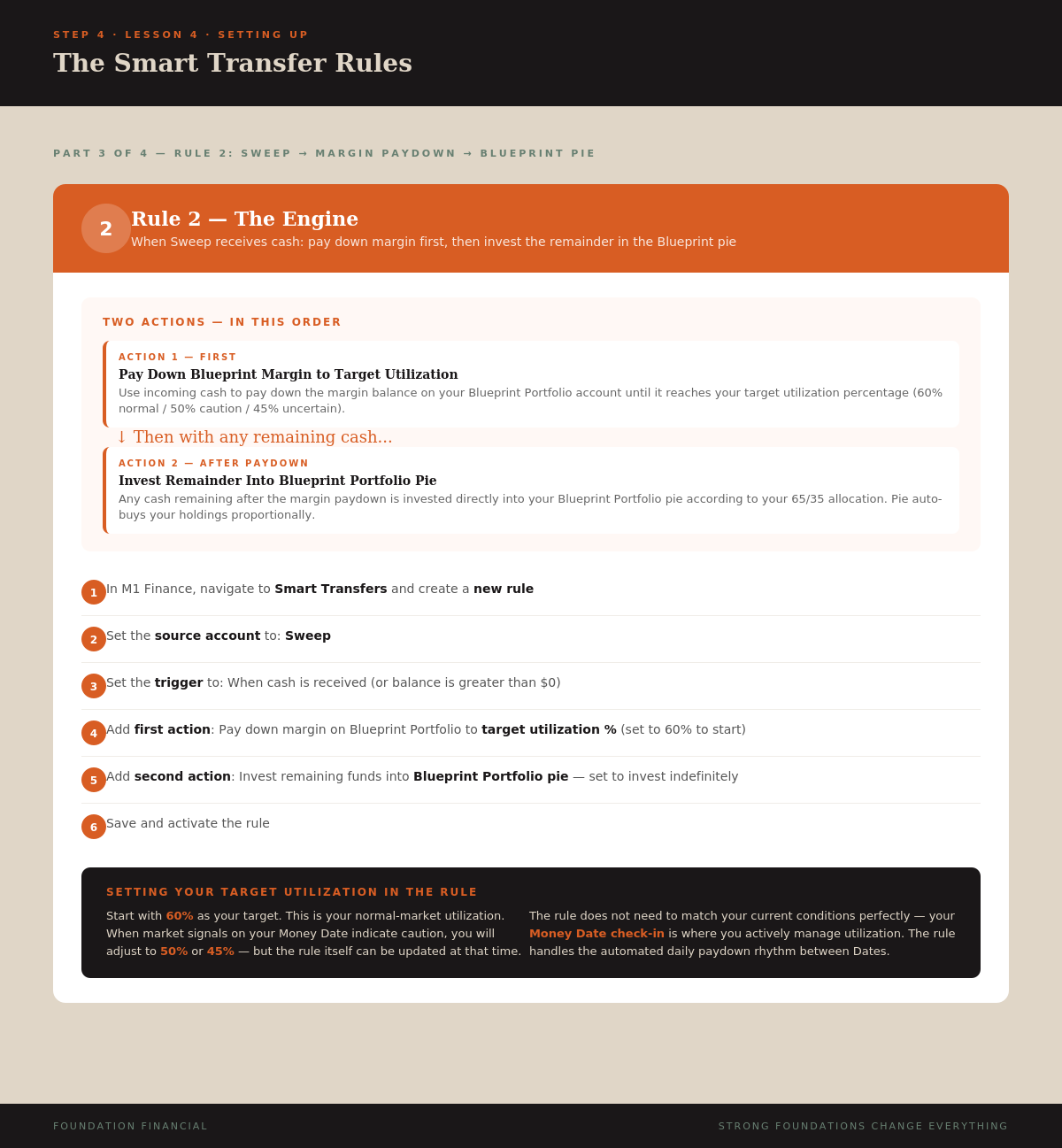
Rule 2 — Sweep to Margin Paydown to Blueprint Pie
When cash arrives in Sweep: first pay down margin on Blueprint Portfolio to target utilization %, then invest remaining cash into the Blueprint Portfolio pie.
This rule fires every time cash arrives in Sweep — from your Monthly Contribution through Rule 1, and from every dividend that sweeps in from both your Blueprint Portfolio and your Safety Buffer.
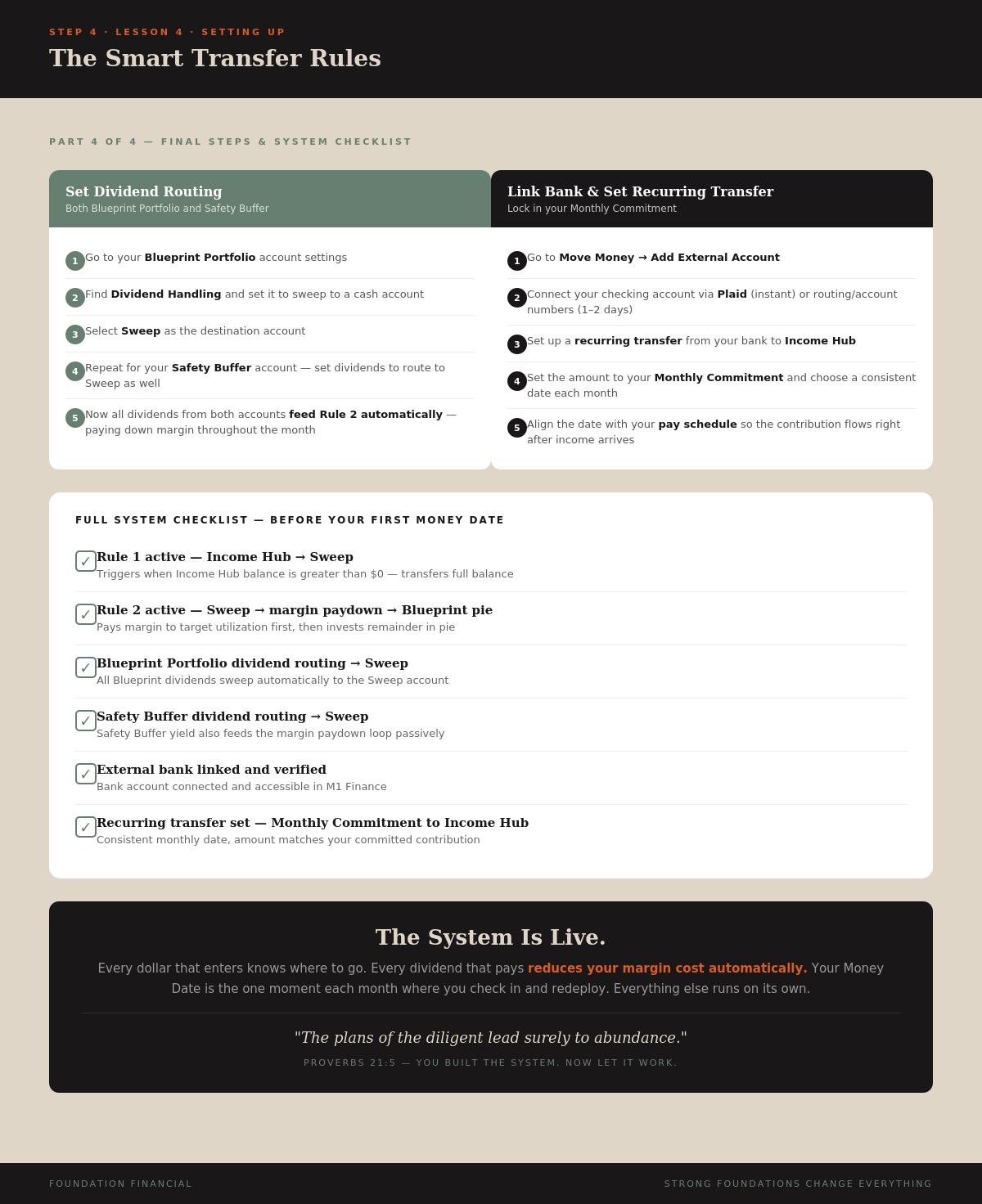
Dividend Routing
- Blueprint Portfolio — dividends sweep to Sweep account → Rule 2 fires → margin paid down → remainder invested
- Safety Buffer — dividends also sweep to Sweep → passively reducing margin cost every month
How the Full ROUTE Works Once Live
- Monthly Contribution arrives in Income Hub from your bank
- Rule 1 fires — full balance moves to Sweep
- Rule 2 fires — pays down margin to target utilization %
- Rule 2 continues — remaining cash invests into Blueprint Portfolio pie
- Dividends pay → route to Sweep
- Rule 2 fires again — more margin paid down, system more efficient
- On your Money Date — check Margin Health Monitor, redeploy margin, loop repeats
Your Full System Checklist
- Rule 1 active — Income Hub → Sweep when balance > $0
- Rule 2 active — Sweep → margin paydown → Blueprint pie
- Blueprint Portfolio auto-invest ON, minimum cash $0
- Blueprint Portfolio dividend routing → Sweep
- Safety Buffer dividend routing → Sweep
- External bank linked and verified
- Recurring monthly transfer set — Monthly Commitment to Income Hub
Infographics
NotebookLM Script (click to expand)
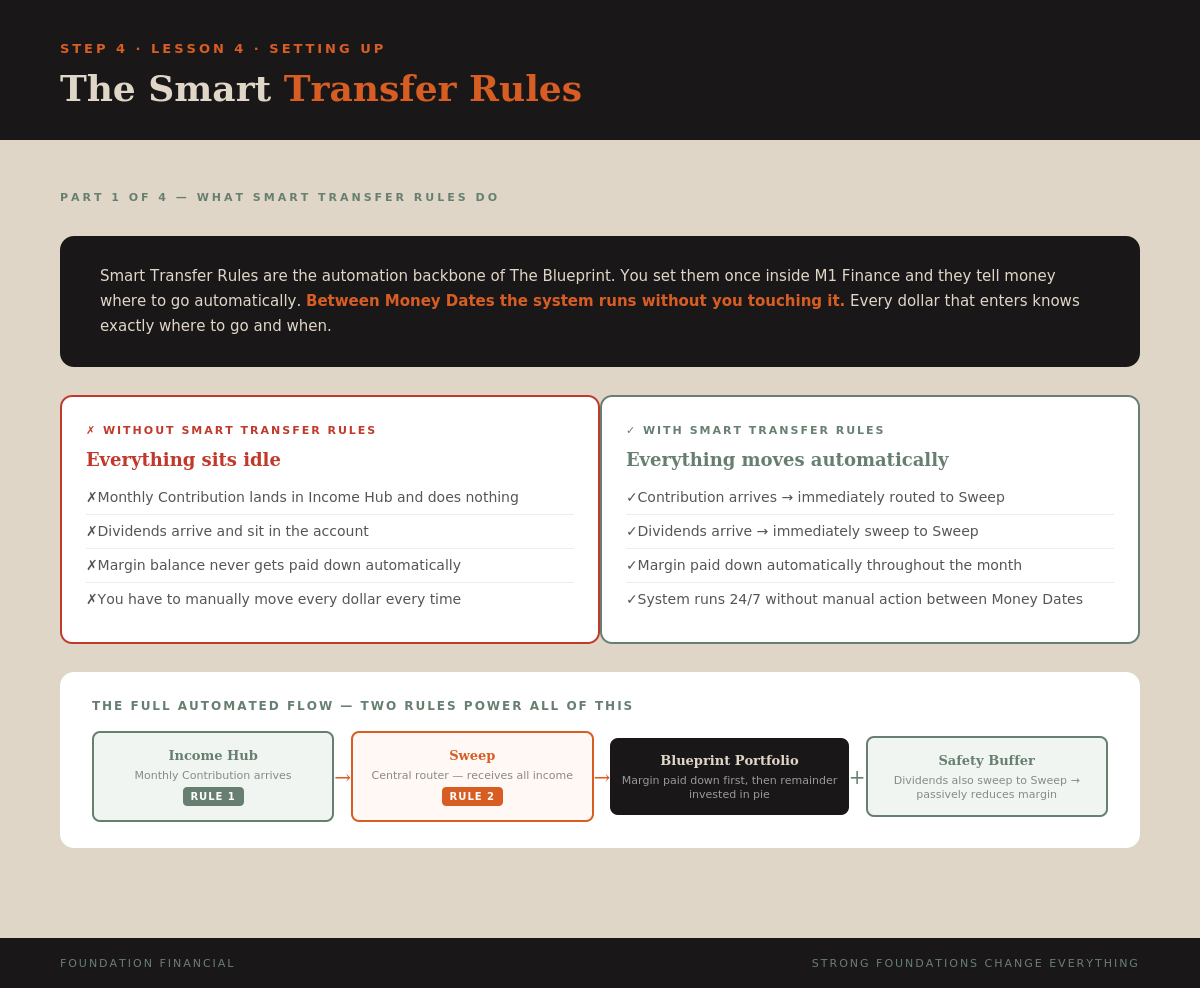
Smart Transfer Rules are the automation backbone of The Blueprint. They are rules you set once inside M1 Finance that tell money where to go automatically.

Rule 1: When Income Hub balance is greater than zero, transfer full balance to Sweep. Income Hub is a pass-through — the moment cash arrives, it moves forward.

Rule 2: When cash arrives in Sweep, first pay down margin on Blueprint Portfolio to target utilization. Then invest remaining cash into the Blueprint pie. This fires on every contribution AND every dividend.

Set dividend routing on both Blueprint Portfolio and Safety Buffer to sweep to the Sweep account. Every dividend automatically reduces margin and keeps the EARN system efficient.

Your Monthly Contribution arrives in Income Hub. Rule 1 moves it to Sweep. Rule 2 pays down margin and invests the rest. Dividends sweep in and Rule 2 fires again. On your Money Date you check the Margin Health Monitor and redeploy. The loop repeats.

That is the fully wired Blueprint system. Running automatically. Managed once a month. Growing every time a contribution arrives and every time a dividend pays.
Key Takeaway
Two Smart Transfer Rules automate your entire ROUTE system. Rule 1 moves income to Sweep. Rule 2 pays down margin then invests the rest. Dividends feed back in automatically. Between Money Dates, the system runs without you touching it.
You Know How to Run It
You understand your Money Date, the Margin Health Monitor, the market signals, and how to manage the system through different conditions.
Next: Become a faithful steward — what comes after the system is running.
Next: The Faithful Steward →